ProjectsAIO — Best For
✅ Product & Engineering teams
✅ QA & Testing workflows
✅ Sprint + Release tracking
✅ AI Managers Included


One platform to plan, execute, test, and deliver — without workarounds.
Start your 14-day free trial
✅ Product & Engineering teams
✅ QA & Testing workflows
✅ Sprint + Release tracking
✅ AI Managers Included
✅ Operations & marketing teams
✅ Custom boards
✅ Lightweight tracking

Feature
ProjectsAIO

Monday.com
Projects & Tasks


Subtasks


Sprint Management
Agile + V-Model


Test Management
Built-in
Ticketing & Issues
AI Managers
Native
Project Checklist
Advanced
Dependencies
Document Vault
Communication Hub
Pricing Transparency
Wigpaw Mode

Organization Checklist
Organisation Chart
Customisation Dashboard
Coverage Matrix
Time Tracking
Legend

Full Support

Partial Support

Not Available
A little line about what’s being said and who’s saying it.
“
The way the sprint management is created which is really helpful for different teams and projects and coverage matrix is really helpful to track the requirement clearly.
- Sherry Pannell
“
Projects AIO makes managing projects easier by keeping tasks, planning, milestones, and testing together. It gives teams a clear view of progress and helps everyone stay organized and connected. A little more guidance for first-time users would make the experience even more welcoming.
- Gray Cruz
“
User-Friendly UI: The interface is clean,
intuitive, and easy to navigate. Good Performance: The application works
smoothly and provides a good user
experience. Responsive Design: The layout adapts well to different screen sizes. Easy Navigation: Features are well-organized and easy to access. Team Collaboration: The project supports better coordination and efficient teamwork. Continuous Improvement: Regular updates and enhancenmrt make the application
better. Overall Experience: Project AIO is a useful and well-structured application that improves
- Minaz Metar
“
ProjectsAIO has made managing projects and coordinating with the team much easier. Having tasks, sprint planning, bug tracking, testing, and documentation in one place helps us stay organized and maintain better visibility across the project lifecycle. The AI-powered features and Focus Mode also offer great potential to improve productivity and simplify everyday work. Overall, ProjectsAIO is a valuable platform that helps teams work more efficiently, collaborate better, and manage projects with greater clarity and control.
- Aaron Walker
“
What I appreciate most about Projects AIO is how it brings structure and clarity to day-to- day work. Having tasks, updates, and progress in one place helps to stay on top of the responsibilities, manage priorities better, and maintain consistency in the work. It makes everyday work more organized and purposeful.
- Hema Ramin
“
Hiring and onboarding have a lot of small steps, like interviews, offer letters, documents and system access. I used to keep a checklist in my notebook. Now I set it up in Projects AIO once and just tick things off. When a new person joins, I know exactly what's done and what's left.
- Sophie Shukla
“
ProjectsAIO has been a valuable platform for streamlining project management and keeping everything organized in one place.
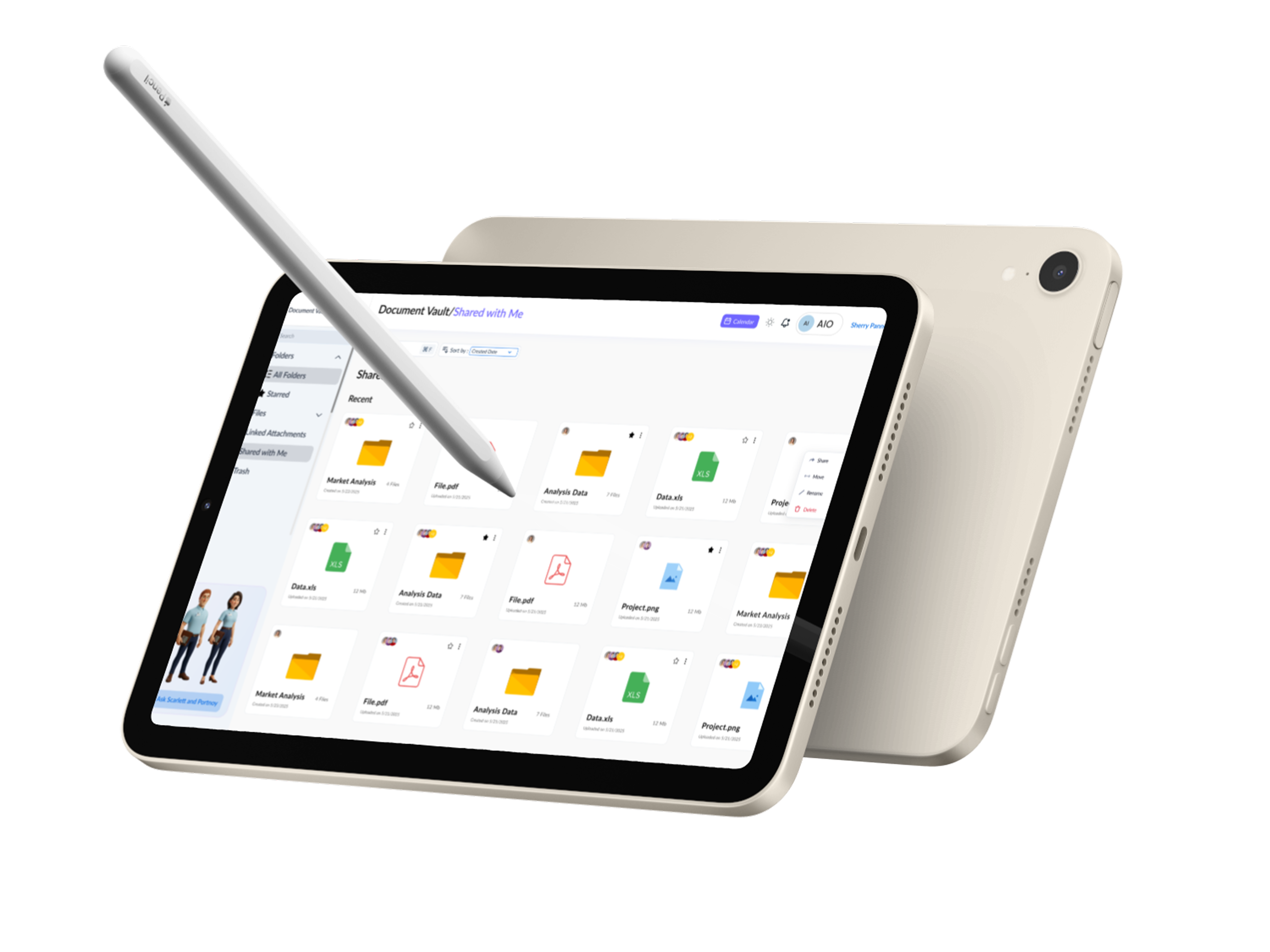
One of its most important features is the Document Vault, which provides a centralized and secure space to store and manage all project related files, folders, and attachments. Instead of searching through emails, multiple folders, or different platforms, users can easily access important documents whenever they need them. ProjectsAIO makes project management simpler, more organized, and more efficient by bringing all essential project resources together in one place.
- Tabitha U
“
Project AIO has a clean and user-friendly interface that makes work easier. The features are well-organized and help manage tasks efficiently. The application runs smoothly and supports better team collaboration. Overall, it is a useful platform that improves productivity and workflow.
- Trudy Carter
“
Projects AIO redefines project management by bringing everything a modern team needs into one intelligent, connected ecosystem. Unlike traditional PMT software, it combines powerful project management, Sprint and V-Model methodologies, AI agents, Focus Mode for distraction-free productivity, a unified Communication Hub, and a centralized Document Vault—all under one roof. From sprint planning and software testing to bug tracking, time management, Projects AIO connects every stage of the
project lifecycle seamlessly. Its intelligent AI capabilities help simplify workflows, while integrated communication and document management keep teams aligned and information accessible. What truly sets Projects AIO apart is its flexibility, versatility, and all-in-one approach, empowering teams to reduce tool switching, collaborate more effectively, and deliver projects with greater clarity, control, and efficiency.
- Nafi Parker
“
ProjectsAIO is an excellent all-in-one project management platform! It simplifies task management, team collaboration, sprint planning, and testing with AI-powered features. Its user-friendly interface helps teams stay organized, boost productivity, and deliver projects more efficiently. I highly recommend ProjectsAIO to any team looking to streamline workflows, improve collaboration, and take project management to the next level!
- Jay Jesson
“
Project AIO provides a convenient and efficient way to manage projects, tasks, and team activities in one place. Features like Focus Mode help me prioritize important tasks and stay focused, while the To-Do list makes it easier to organize daily responsibilities and track pending work. Sprint Management helps me plan and track sprint activities, monitor progress, and stay aligned with project goals. The AI Chat feature adds further value by helping me get information and support more efficiently. With task tracking, team visibility, and project management tools all in one platform, Project AIO makes day-to-day work more organized, improves productivity, and helps me manage my workload effectively. Overall, it offers a user-friendly experience that supports better planning, collaboration, and time management.
- Kayla Sekar
See More
Billing is monthly or yearly. Credits are purchased separately and applied across products.
Yes — you can upgrade, downgrade, or cancel anytime. Yearly plans are prorated on changes.
One platform to plan, execute, test, and deliver — without workarounds.
Start your 14-day free trial
✅ Product & Engineering teams
✅ QA & Testing workflows
✅ Sprint + Release tracking
✅ AI Managers Included
✅ Operations & marketing teams
✅ Custom boards
✅ Lightweight tracking
Feature
ProjectsAIO
Monday.com
Projects & Tasks

Subtasks
Sprint Management
Agile + V-Model
Test Management
Built-in
Ticketing & Issues
AI Managers
Native
Project Checklist
Dependencies
Document Vault
Communication Hub
Pricing Transparency
Wigpaw Mode
Organization Checklist
Organisation Chart
Customisation Dashboard
Coverage Matrix
Time Tracking

Legend
Full Support
Partial Support
Not Available
A little line about what’s being said and who’s saying it.
“
The way the sprint management is created which is really helpful for different teams and projects and coverage matrix is really helpful to track the requirement clearly.
- Sherry Pannell
“
Projects AIO makes managing projects easier by keeping tasks, planning, milestones, and testing together. It gives teams a clear view of progress and helps everyone stay organized and connected. A little more guidance for first-time users would make the experience even more welcoming.
- Gray Cruz
“
User-Friendly UI: The interface is clean,
intuitive, and easy to navigate. Good Performance: The application works
smoothly and provides a good user
experience. Responsive Design: The layout adapts well to different screen sizes. Easy Navigation: Features are well-organized and easy to access. Team Collaboration: The project supports better coordination and efficient teamwork. Continuous Improvement: Regular updates and enhancenmrt make the application
better. Overall Experience: Project AIO is a useful and well-structured application that improves
- Minaz Metar
“
ProjectsAIO has made managing projects and coordinating with the team much easier. Having tasks, sprint planning, bug tracking, testing, and documentation in one place helps us stay organized and maintain better visibility across the project lifecycle. The AI-powered features and Focus Mode also offer great potential to improve productivity and simplify everyday work. Overall, ProjectsAIO is a valuable platform that helps teams work more efficiently, collaborate better, and manage projects with greater clarity and control.
- Aaron Walker
“
What I appreciate most about Projects AIO is how it brings structure and clarity to day-to- day work. Having tasks, updates, and progress in one place helps to stay on top of the responsibilities, manage priorities better, and maintain consistency in the work. It makes everyday work more organized and purposeful.
- Hema Ramin
“
Hiring and onboarding have a lot of small steps, like interviews, offer letters, documents and system access. I used to keep a checklist in my notebook. Now I set it up in Projects AIO once and just tick things off. When a new person joins, I know exactly what's done and what's left.
- Sophie Shukla
“
ProjectsAIO has been a valuable platform for streamlining project management and keeping everything organized in one place.
One of its most important features is the Document Vault, which provides a centralized and secure space to store and manage all project related files, folders, and attachments. Instead of searching through emails, multiple folders, or different platforms, users can easily access important documents whenever they need them. ProjectsAIO makes project management simpler, more organized, and more efficient by bringing all essential project resources together in one place.
- Tabitha U
“
Project AIO has a clean and user-friendly interface that makes work easier. The features are well-organized and help manage tasks efficiently. The application runs smoothly and supports better team collaboration. Overall, it is a useful platform that improves productivity and workflow.
- Trudy Carter
“
Projects AIO redefines project management by bringing everything a modern team needs into one intelligent, connected ecosystem. Unlike traditional PMT software, it combines powerful project management, Sprint and V-Model methodologies, AI agents, Focus Mode for distraction-free productivity, a unified Communication Hub, and a centralized Document Vault—all under one roof. From sprint planning and software testing to bug tracking, time management, Projects AIO connects every stage of the
project lifecycle seamlessly. Its intelligent AI capabilities help simplify workflows, while integrated communication and document management keep teams aligned and information accessible. What truly sets Projects AIO apart is its flexibility, versatility, and all-in-one approach, empowering teams to reduce tool switching, collaborate more effectively, and deliver projects with greater clarity, control, and efficiency.
- Nafi Parker
“
ProjectsAIO is an excellent all-in-one project management platform! It simplifies task management, team collaboration, sprint planning, and testing with AI-powered features. Its user-friendly interface helps teams stay organized, boost productivity, and deliver projects more efficiently. I highly recommend ProjectsAIO to any team looking to streamline workflows, improve collaboration, and take project management to the next level!
- Jay Jesson
“
Project AIO provides a convenient and efficient way to manage projects, tasks, and team activities in one place. Features like Focus Mode help me prioritize important tasks and stay focused, while the To-Do list makes it easier to organize daily responsibilities and track pending work. Sprint Management helps me plan and track sprint activities, monitor progress, and stay aligned with project goals. The AI Chat feature adds further value by helping me get information and support more efficiently. With task tracking, team visibility, and project management tools all in one platform, Project AIO makes day-to-day work more organized, improves productivity, and helps me manage my workload effectively. Overall, it offers a user-friendly experience that supports better planning, collaboration, and time management.
- Kayla Sekar
See More
Billing is monthly or yearly. Credits are purchased separately and applied across products.
Yes — you can upgrade, downgrade, or cancel anytime. Yearly plans are prorated on changes.
One platform to plan, execute, test, and deliver — without workarounds.
Start your 14-day free trial
✅ Product & Engineering teams
✅ QA & Testing workflows
✅ Sprint + Release tracking
✅ AI Managers Included
✅ Operations & marketing teams
✅ Custom boards
✅ Lightweight tracking
Feature
ProjectsAIO
Monday.com
Projects & Tasks


Subtasks

Sprint Management
Agile + V-Model

Test Management
Built-in
Ticketing & Issues
AI Managers
Native
Project Checklist
Dependencies
Document Vault
Communication Hub
Pricing Transparency
Wigpaw Mode
Organization Checklist
Organisation Chart
Customisation Dashboard
Coverage Matrix
Time Tracking
Legend

Full Support

Partial Support

Not Available
A little line about what’s being said and who’s saying it.
“
The way the sprint management is created which is really helpful for different teams and projects and coverage matrix is really helpful to track the requirement clearly.
- Sherry Pannell
“
Projects AIO makes managing projects easier by keeping tasks, planning, milestones, and testing together. It gives teams a clear view of progress and helps everyone stay organized and connected. A little more guidance for first-time users would make the experience even more welcoming.
- Gray Cruz
“
User-Friendly UI: The interface is clean,
intuitive, and easy to navigate. Good Performance: The application works
smoothly and provides a good user
experience. Responsive Design: The layout adapts well to different screen sizes. Easy Navigation: Features are well-organized and easy to access. Team Collaboration: The project supports better coordination and efficient teamwork. Continuous Improvement: Regular updates and enhancenmrt make the application
better. Overall Experience: Project AIO is a useful and well-structured application that improves
- Minaz Metar
“
ProjectsAIO has made managing projects and coordinating with the team much easier. Having tasks, sprint planning, bug tracking, testing, and documentation in one place helps us stay organized and maintain better visibility across the project lifecycle. The AI-powered features and Focus Mode also offer great potential to improve productivity and simplify everyday work. Overall, ProjectsAIO is a valuable platform that helps teams work more efficiently, collaborate better, and manage projects with greater clarity and control.
- Aaron Walker
“
What I appreciate most about Projects AIO is how it brings structure and clarity to day-to- day work. Having tasks, updates, and progress in one place helps to stay on top of the responsibilities, manage priorities better, and maintain consistency in the work. It makes everyday work more organized and purposeful.
- Hema Ramin
“
Hiring and onboarding have a lot of small steps, like interviews, offer letters, documents and system access. I used to keep a checklist in my notebook. Now I set it up in Projects AIO once and just tick things off. When a new person joins, I know exactly what's done and what's left.
- Sophie Shukla
“
ProjectsAIO has been a valuable platform for streamlining project management and keeping everything organized in one place.
One of its most important features is the Document Vault, which provides a centralized and secure space to store and manage all project related files, folders, and attachments. Instead of searching through emails, multiple folders, or different platforms, users can easily access important documents whenever they need them. ProjectsAIO makes project management simpler, more organized, and more efficient by bringing all essential project resources together in one place.
- Tabitha U
“
Project AIO has a clean and user-friendly interface that makes work easier. The features are well-organized and help manage tasks efficiently. The application runs smoothly and supports better team collaboration. Overall, it is a useful platform that improves productivity and workflow.
- Trudy Carter
“
Projects AIO redefines project management by bringing everything a modern team needs into one intelligent, connected ecosystem. Unlike traditional PMT software, it combines powerful project management, Sprint and V-Model methodologies, AI agents, Focus Mode for distraction-free productivity, a unified Communication Hub, and a centralized Document Vault—all under one roof. From sprint planning and software testing to bug tracking, time management, Projects AIO connects every stage of the
project lifecycle seamlessly. Its intelligent AI capabilities help simplify workflows, while integrated communication and document management keep teams aligned and information accessible. What truly sets Projects AIO apart is its flexibility, versatility, and all-in-one approach, empowering teams to reduce tool switching, collaborate more effectively, and deliver projects with greater clarity, control, and efficiency.
- Nafi Parker
“
ProjectsAIO is an excellent all-in-one project management platform! It simplifies task management, team collaboration, sprint planning, and testing with AI-powered features. Its user-friendly interface helps teams stay organized, boost productivity, and deliver projects more efficiently. I highly recommend ProjectsAIO to any team looking to streamline workflows, improve collaboration, and take project management to the next level!
- Jay Jesson
“
Project AIO provides a convenient and efficient way to manage projects, tasks, and team activities in one place. Features like Focus Mode help me prioritize important tasks and stay focused, while the To-Do list makes it easier to organize daily responsibilities and track pending work. Sprint Management helps me plan and track sprint activities, monitor progress, and stay aligned with project goals. The AI Chat feature adds further value by helping me get information and support more efficiently. With task tracking, team visibility, and project management tools all in one platform, Project AIO makes day-to-day work more organized, improves productivity, and helps me manage my workload effectively. Overall, it offers a user-friendly experience that supports better planning, collaboration, and time management.
- Kayla Sekar
See More
Billing is monthly or yearly. Credits are purchased separately and applied across products.
Yes — you can upgrade, downgrade, or cancel anytime. Yearly plans are prorated on changes.